


Find the Right Keyword for Google Ads Campaigns
Choosing the right keyword for Google Ads is the foundation of every profitable paid advertising campaign. No matter how strong your ad copy or landing page is, everything starts—and often ends—with keywords. In fact, the right keyword for Google Ads determines who sees your ad, when they see it, and why they click. Within the first few days of running ads, keywords alone can decide whether your budget generates leads or disappears without results.
Keywords act as the bridge between user intent and your offer. When someone types a query into Google, they’re revealing exactly what they want at that moment. If your keyword aligns with that intent, your ad enters the auction with relevance. If it doesn’t, you may still get clicks—but they won’t convert.
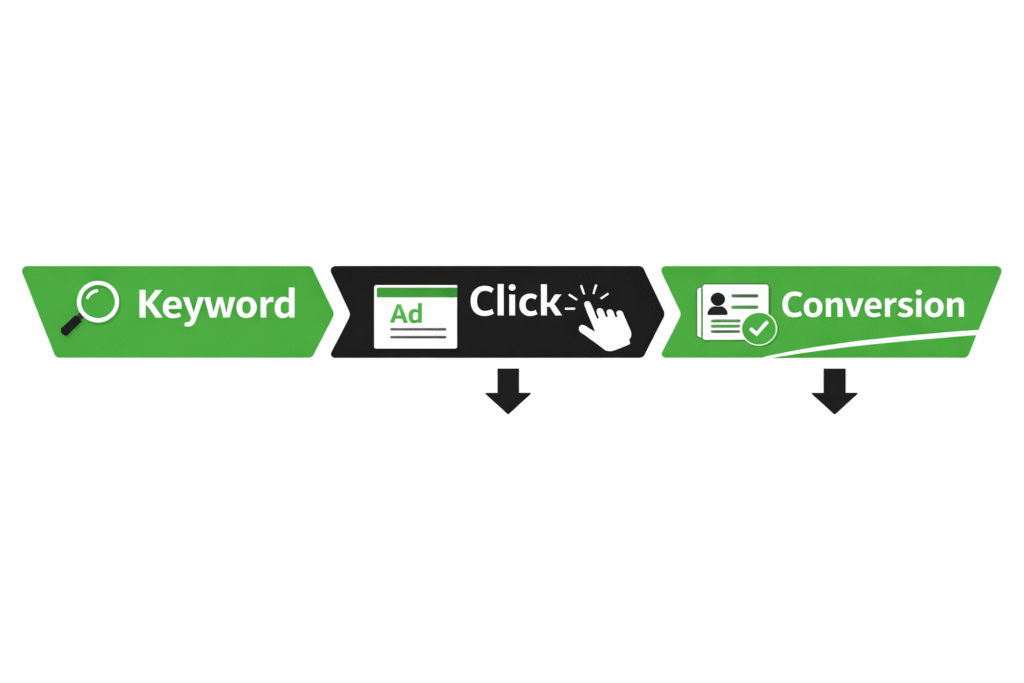
This is where many advertisers fail. The wrong keyword wastes budget by attracting users who are only researching, browsing, or comparing—not buying. For example, a keyword like “what is Google Ads” may bring traffic, but it rarely brings sales. These clicks inflate impressions and CTR while silently draining your ad spend.
To avoid this, it’s critical to understand the difference between traffic keywords and buyer keywords. Traffic keywords generate volume and visibility but often lack commercial intent. Buyer keywords, on the other hand, include signals like “pricing,” “services,” “hire,” “best,” or “near me.” These keywords may have lower search volume, but they bring users who are closer to taking action.
Successful advertisers don’t chase traffic—they chase intent. A well-planned google ads keyword strategy focuses on relevance, conversion potential, and long-term ROI rather than vanity metrics. This is why proper keyword research for paid ads is not just a setup step—it’s an ongoing optimization process that separates profitable campaigns from failed ones.
When you choose keywords with clear intent, Google rewards you with higher Quality Scores, lower CPCs, and better ad positions—turning every click into a real opportunity instead of a cost.
Understanding Search Intent: The Core of Profitable Google Ads Keywords
At the heart of every high-performing Google Ads campaign lies one critical concept: search intent. You can select high-volume keywords, write compelling ads, and design optimized landing pages—but if the intent behind the keyword is wrong, conversions will always suffer.
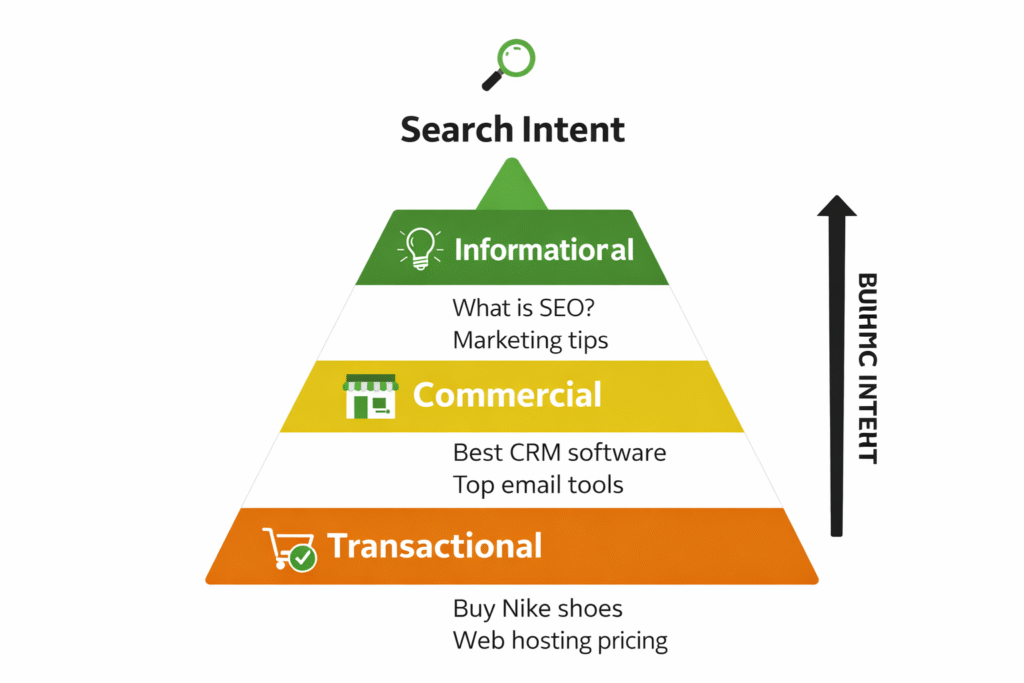
Search intent explains why a user is searching, not just what they are searching for. In Google Ads, understanding intent is more important than search volume because paid traffic costs money. Every irrelevant click directly eats into your budget.
Broadly, search intent can be divided into four types:
- Informational intent – The user is learning
Example: “How Google Ads works”
These users want answers, not offers. Running ads on such keywords usually leads to high bounce rates and low conversion rates. - Navigational intent – The user wants a specific brand or platform
Example: “Google Ads login”
These keywords rarely make sense for advertisers unless you are the brand being searched. - Commercial investigation intent – The user is comparing options
Example: “best Google Ads agency”
These keywords are valuable for awareness and remarketing, but may convert more slowly. - Transactional (buyer) intent – The user is ready to act
Example: “hire Google Ads expert” or “Google Ads management pricing”
These are the most profitable keywords for Google Ads.
The biggest mistake advertisers make is targeting informational keywords with transactional expectations. This mismatch leads to clicks without conversions, low Quality Scores, and rising cost per acquisition. Google’s algorithm notices this behavior and gradually pushes your ads into weaker positions or higher CPC brackets.
When intent matches your offer, everything improves—CTR increases, landing page relevance improves, and conversions happen more naturally. This is why professional advertisers often prefer lower-volume, high-intent keywords over popular but vague terms.
A smart google ads keyword strategy prioritizes intent first, then volume second. During keyword research for paid ads, always ask one question:
👉 Is the user ready to buy, or just looking to learn?
Answering that correctly is what turns Google Ads from an expense into a scalable growth channel.
Also Read: Must-Have Tools to Learn Digital Marketing in 2026
Keyword Match Types in Google Ads: Control Traffic, Cost, and Conversions
Keyword match types are one of the most powerful—and misunderstood—controls in Google Ads. They decide how closely a user’s search query must match your keyword before your ad is shown. Choosing the wrong match type can either choke your reach or flood your campaign with irrelevant clicks.
Google Ads offers three primary match types: Broad Match, Phrase Match, and Exact Match. Each serves a different purpose, and using them correctly can dramatically improve performance.
Broad Match gives Google maximum freedom. Your ads can show for related searches, synonyms, and even loosely connected queries. While this increases reach, it also increases risk. Broad match works best only when paired with strong conversion data, smart bidding, and a solid negative keyword list. Without these, it’s one of the fastest ways to burn budget.
Phrase Match strikes a balance between control and reach. Your ad appears when the search includes the meaning of your keyword in the correct context. It filters out many irrelevant searches while still allowing Google’s algorithm to find variations you may not think of. For most advertisers, phrase match is the safest starting point.
Exact Match offers the highest level of control. Ads show only when the search closely matches your keyword’s intent. While volume is lower, conversion rates are usually higher because intent alignment is strong. Exact match is ideal for high-intent buyer keywords where every click matters.
The mistake many beginners make is relying on one match type only. A scalable google ads keyword strategy layers match types: exact match for core buyer terms, phrase match for controlled expansion, and broad match only after sufficient data is available.
Match types also directly affect Quality Score, CPC, and search term relevance. Better control leads to better engagement—and Google rewards that with lower costs.
During keyword research for paid ads, always decide how much freedom you want to give Google. The right match type doesn’t just bring traffic—it brings the right traffic.
Also Read: Do Keywords Still Matter for SEO? Yes—But Not How You Think
How to Identify High-Converting Keywords
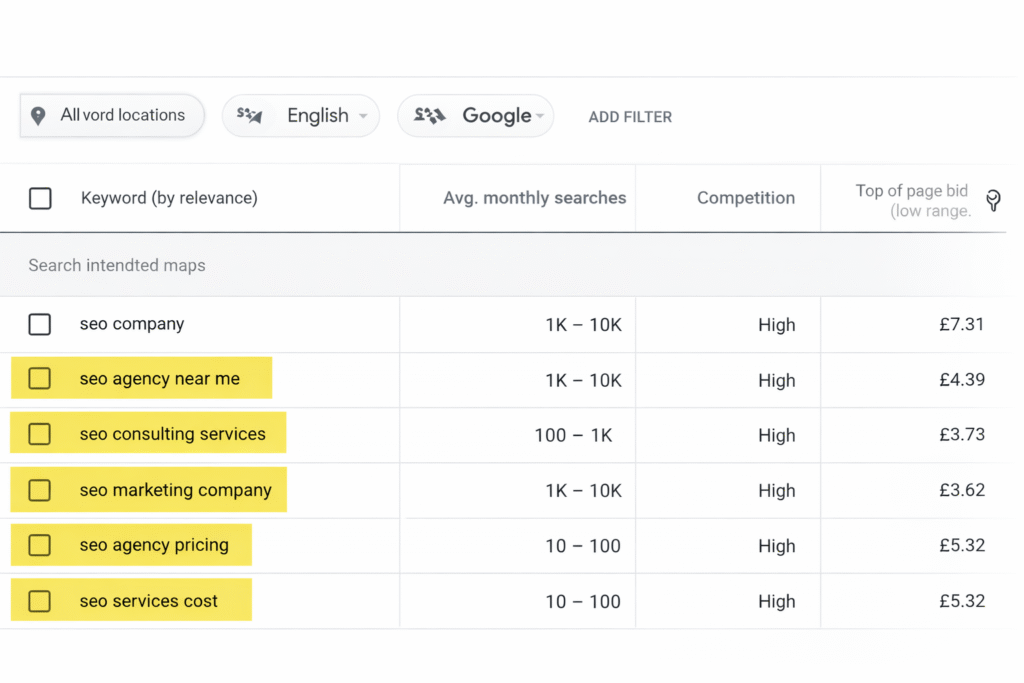
Not all keywords are created equal. Some bring traffic, others bring clicks—but only a specific category brings conversions. High-converting keywords are those that signal strong purchase intent, meaning the user is already close to making a decision. Identifying these keywords correctly can dramatically reduce wasted ad spend and improve ROI.
Below are the most reliable ways to spot high-converting Google Ads keywords—the kind that consistently generate leads and sales.
1. Keywords With Price & Cost Modifiers (Strong Buyer Signals)
Keywords that include price-related terms are among the highest-converting in Google Ads. Why? Because users searching for pricing are no longer researching—they’re evaluating options and preparing to buy.
Common price-based modifiers include:
- cost
- pricing
- fees
- charges
- plans
- packages
For example:
- “Google Ads management cost”
- “SEO services pricing”
- “CRM software pricing plans”
These users understand that the service is paid and are actively comparing providers. While CPCs are often higher, conversion rates are significantly stronger because intent is clear.
From a strategy perspective, price keywords are ideal for:
- Lead generation campaigns
- Service-based businesses
- High-ticket offers
If your landing page clearly explains value and pricing logic, these keywords can deliver some of the best cost-per-lead results.
2. Service + Location Keywords (Local Intent = Fast Conversions)
Another powerful category is service + location keywords. These keywords indicate immediate need and local intent, making them especially valuable for agencies, consultants, and local businesses.
Examples include:
- “SEO agency near me”
- “Google Ads expert in Delhi”
- “digital marketing services Mumbai”
Users searching with location intent are usually ready to contact someone quickly. They’re not browsing—they’re shortlisting. This is why such keywords often have:
- High conversion rates
- Short decision cycles
- Strong call or form-fill intent
To maximize performance, landing pages must reinforce local relevance with city mentions, testimonials, maps, or local proof. When intent and location align, Google rewards ads with higher relevance and better Quality Scores.
3. Action-Based Keywords (Intent in Motion)
Action-based keywords contain verbs that indicate readiness to act. These keywords outperform generic terms because they reflect a decision-making mindset.
High-intent action words include:
- hire
- book
- get
- sign up
- consult
- manage
- buy
Examples:
- “hire Google Ads consultant.”
- “book SEO audit”
- “Get PPC management services.”
These keywords are gold for conversion-focused campaigns. Even with lower search volume, they often outperform high-volume keywords because every click is closer to a transaction.
Action-based keywords work best with:
- Clear CTAs
- Conversion-optimized landing pages
- Direct offers (consultation, demo, audit)
4. Why High-Converting Keywords Matter More Than Volume
Many advertisers chase search volume and ignore intent. This leads to campaigns with:
- High impressions
- Decent CTR
- Poor conversions
High-converting keywords flip this equation. They may generate fewer clicks, but those clicks are worth more. Over time, this improves:
- Conversion rate
- Cost per acquisition
- Return on ad spend
When identifying keywords, always ask:
👉 Is this user ready to spend money—or just looking for information?
If the answer is “ready,” you’re on the right track.
Putting It Into Practice
The strongest campaigns combine:
- Price-based keywords for qualified leads
- Service + location keywords for fast decisions
- Action-based keywords for immediate conversions
This combination forms the backbone of any profitable Google Ads account.
Also Read: How to Create a Content Plan That Actually Works in 2026
Keywords You Should Avoid in Google Ads
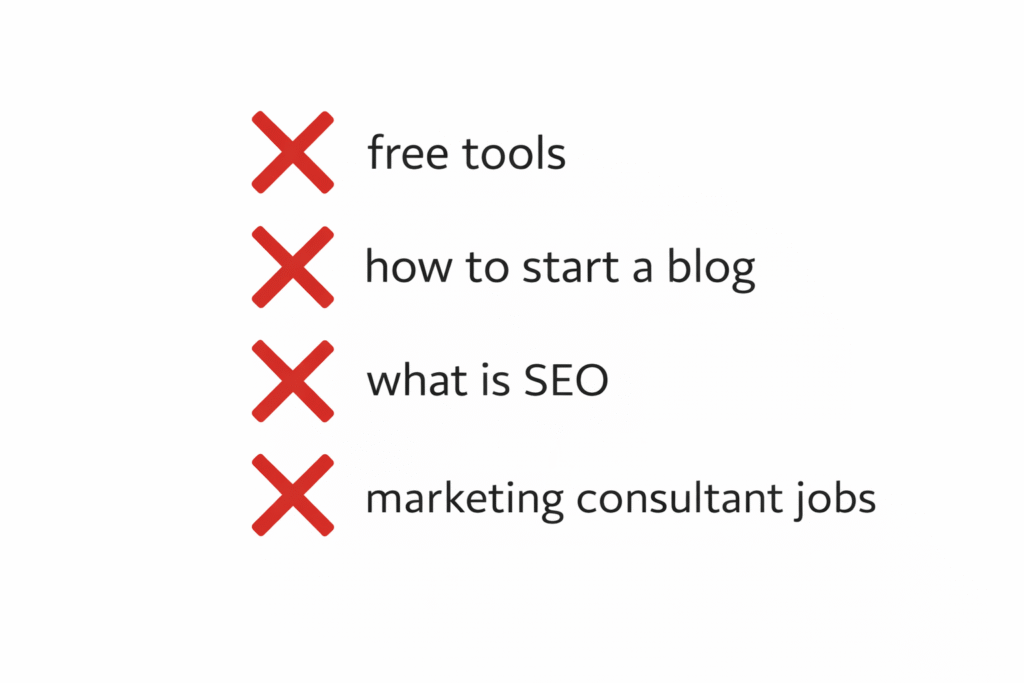
One of the fastest ways to lose money on Google Ads is targeting the wrong keywords. While most advertisers focus heavily on which keywords to include, professionals spend equal—if not more—time deciding which keywords to avoid. Blocking low-quality traffic is just as important as attracting the right users.
Below are the main types of keywords you should avoid or strictly control in Google Ads to protect your budget and improve conversion quality.
1. Research-Only Keywords (Clicks Without Conversions)
Research-based keywords attract users who are learning, not buying. These searches usually come from beginners, students, or people early in the awareness stage. While they may generate impressions and clicks, they rarely convert into leads or sales.
Examples include:
- What is SEO
- How Google Ads works
- SEO tutorial for beginners
Running ads on these keywords often results in:
- High bounce rates
- Low conversion rates
- Poor Quality Scores
Unless your goal is pure awareness or content promotion, these keywords should be excluded or tightly controlled using negatives.
2. “Free”, “Jobs”, and Definition-Based Keywords
Keywords containing words like free, jobs, meaning, or definition are some of the most dangerous for paid campaigns.
Why?
- Users searching for “free” are actively avoiding payment
- “Jobs” attracts job seekers, not customers
- “Meaning” or “definition” signals academic or informational intent
Examples:
- free SEO tools
- Google Ads jobs
- SEO meaning
These clicks almost never convert—and worse, they distort your campaign data, making optimization harder. Adding these terms as negative keywords early can save a significant portion of your budget.
3. Irrelevant Keyword Variations
Sometimes keywords look relevant on the surface but attract the wrong audience due to a variation mismatch. This often happens with:
- Broad match keywords without negatives
- Industry terms with multiple meanings
- Keywords targeting the wrong customer size or use case
For example:
- “CRM software” showing ads to students
- “digital marketing course” triggering ads for certification searches
- “SEO tools” attract free-tool hunters instead of service buyers
Regularly reviewing the search terms report is essential to catch and block these variations before they scale spend.
4. Why Avoiding Bad Keywords Is a Growth Strategy
Blocking low-intent keywords does more than save money:
- Improves conversion rate
- Strengthens Quality Score
- Helps smart bidding learn faster
- Redirects budget to high-performing terms
This is why building a strong negative keywords Google Ads list is not optional—it’s foundational.
Common Bad Keywords to Avoid
| Bad Keyword | Reason |
| free tools | Low buying intent |
| What is SEO | Informational only |
Watch : Different Type of Keywords in Google Ad
How to Use Negative Keywords to Protect Your Budget
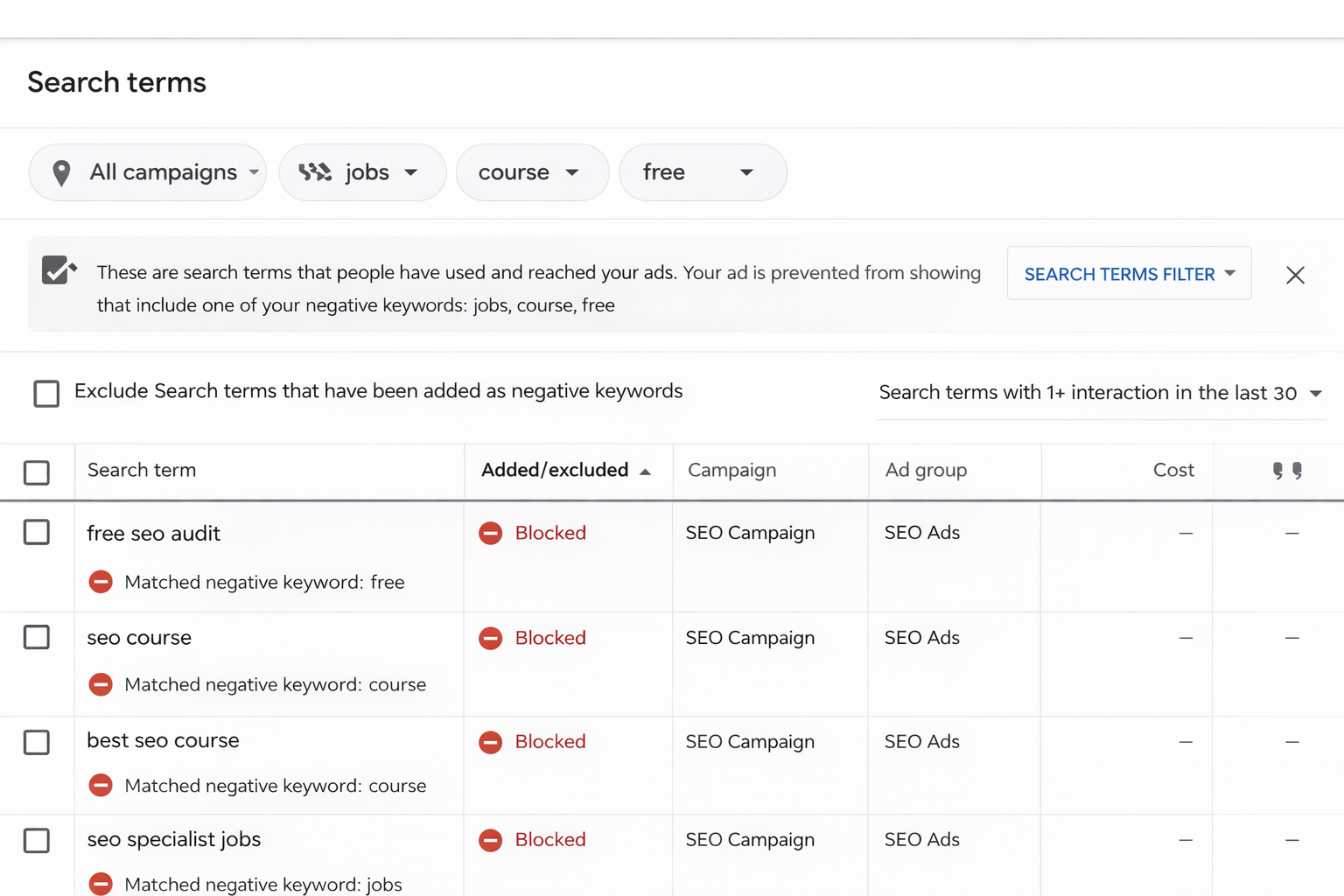
Negative keywords are one of the most powerful budget-protection tools in Google Ads, yet they’re often ignored by beginners. While regular keywords tell Google when to show your ad, negative keywords tell Google when NOT to show it. Used correctly, they can instantly reduce wasted spend and improve conversion quality.
Simply put, negative keywords prevent your ads from appearing for irrelevant or low-intent searches. Every blocked search is money saved—and redirected toward users who are more likely to convert.
What Are Negative Keywords?
Negative keywords are words or phrases that exclude your ads from showing when they appear in a search query. For example, if you offer paid services and add “free” as a negative keyword, your ads won’t show for searches like “free SEO services” or “Google Ads free course”.
This ensures your budget is spent only on users aligned with your offer.
Types of Negative Keywords
Just like regular keywords, negative keywords come in three match types, each with a specific use case:
1. Broad Match Negative
Blocks searches containing all parts of the keyword, in any order.
Best for removing wide categories of irrelevant traffic.
Example:
Negative keyword: free
Blocks: free tools, free online tools, get free software
2. Phrase Match Negative
Blocks searches containing the exact phrase in the same order.
Useful when you want precision without overblocking.
Example:
Negative keyword: “seo course.”
Blocks: best seo course online
Does NOT block: seo training institute
3. Exact Match Negative
Blocks only the exact search term.
Best when a specific query wastes money, but related terms convert.
Example:
Negative keyword: [seo jobs]
Blocks: seo jobs
Allows: seo services
How Often Should You Update Negative Keywords?
Negative keyword optimization is not a one-time task.
Best practice:
- New campaigns: check search terms daily (first 7–10 days)
- Stable campaigns: review weekly
- Scaling campaigns: review after every major change
The Search Terms Report is your best friend. It shows exactly what users typed before clicking your ad. Any term that:
- Doesn’t match buying intent
- Attracts the wrong audience
- Has clicks but zero conversions
…should be added as a negative keyword immediately.
Common Negative Keywords to Block Early
Almost every paid campaign should consider blocking:
- free
- jobs
- course
- training
- meaning
- definition
These terms usually signal research intent, job seekers, or learners, not buyers.
Why Negative Keywords Save More Than They Cost
A strong negative keyword strategy:
- Reduces wasted clicks
- Improves Quality Score
- Helps smart bidding optimize faster
- Protects the budget during scaling
If you feel Google Ads is expensive, chances are your ads are showing for the wrong searches. Fixing negatives often delivers faster results than adding new keywords.
Also Read: What Does the Keyword Difficulty Score Tell You
Competitor Keyword Research for Google Ads
Competitor keyword research is one of the fastest ways to find profitable Google Ads keywords—because instead of guessing, you’re learning directly from advertisers who are already spending money in your niche. If competitors are consistently bidding on certain keywords, it’s usually because those keywords convert.
Below are three practical and proven methods to uncover competitor keywords and use them ethically and effectively.
1. Manual Competitor Search Method (Most Underrated)
The simplest—and most powerful—method is manual Google searching.
Start by typing your core service or product keywords into Google, such as:
- SEO services
- Google Ads management
- CRM software
Now observe:
- Which ads appear repeatedly?
- Which businesses show up across different keyword variations?
- Are the ads focused on pricing, demos, free trials, or consultations?
Advertisers who appear consistently are likely investing heavily in those keywords. This tells you two things:
- The keyword has commercial value
- It’s likely producing returns, they would stop bidding
Click the ads and analyze:
- Headlines (what keywords are they emphasizing?)
- Descriptions (what pain points or offers are highlighted?)
- Extensions (pricing, callouts, structured snippets)
This manual process gives you real intent signals that no tool can fully replicate.
2. Using Auction Insights to Identify True Competitors
Once your campaigns are live, Auction Insights becomes a goldmine for competitor keyword research.
Auction Insights shows:
- Who competes with you in the same auctions
- Impression share overlap
- Who outranks you most often
If a competitor has a high overlap rate with your ads, it means:
- They are bidding on similar keywords
- They are targeting a similar audience and intent level
From here, you can:
- Identify aggressive competitors worth studying
- Spot keywords where competition is heating up
- Decide whether to compete, differentiate, or avoid certain terms
Auction Insights doesn’t reveal exact keywords—but it reveals where the real battles are happening.
3. Reverse-Engineering Competitor Ads
Reverse-engineering means breaking down competitor ads to infer keyword intent and targeting strategy.
Look at:
- Keyword themes repeated across multiple ads
- Words like pricing, cost, enterprise, small business, automation, and local
- Landing page messaging and structure
For example:
If multiple competitors emphasize “Google Ads management cost”, “monthly pricing”, or “transparent fees”, it strongly suggests that pricing-related keywords are converting in that market.
Also analyze landing pages:
- Are they targeting enterprise clients or small businesses?
- Are they focused on demos, consultations, or direct sales?
This helps you align your keyword selection with market expectations, not assumptions.
Why Competitor Research Beats Blind Keyword Tools
Traditional tools show volume and CPC—but competitor analysis shows real-world behavior. It answers questions like:
- Which keywords are worth fighting for?
- What intent is converting right now?
- How do competitors position their offers around the same keyword?
A smart competitor keyword analysis doesn’t mean copying ads—it means understanding the logic behind them and building a better strategy.
How to Use Competitor Keywords Strategically
Once identified:
- Add high-intent keywords to your own campaigns
- Adjust match types to control cost
- Use competitor insights to refine ad copy and landing pages
You’re not just learning keywords—you’re learning what the market rewards.
Also Read: How to Know Market Trend Before Your Competitors Do
Keyword Structuring for Better Quality Score
Quality Score is one of the most misunderstood yet impactful factors in Google Ads performance. While many advertisers focus on bids and budgets, keyword structuring quietly determines how much you pay per click and how often your ads win auctions. A well-structured account improves Quality Score by increasing relevance at every stage of the user journey.
At its core, Google rewards advertisers who deliver the best experience. That experience is shaped by how closely your keywords, ad copy, and landing pages align.
One Keyword Theme per Ad Group (Relevance First)
The biggest structural mistake in Google Ads is stuffing unrelated keywords into a single ad group. When keywords are too broad or mixed, ads become generic—and relevance drops.
Instead, each ad group should focus on one tight keyword theme. For example:
- Ad Group 1: Google Ads management cost
- Ad Group 2: Google Ads management services
- Ad Group 3: Hire Google Ads expert
This allows you to:
- Write ads that directly mirror search queries
- Increase click-through rate (CTR)
- Improve ad relevance and Quality Score
When users see their exact intent reflected in your ad, they’re far more likely to click.
SKAG vs Themed Ad Groups (What Works Today)
SKAG (Single Keyword Ad Groups) were once the gold standard. Each ad group contained one keyword (with multiple match types). This gave maximum control and relevance—but also created large, complex accounts that are hard to manage today.
Modern Google Ads works better with themed ad groups:
- Group closely related keywords with the same intent
- Use phrase and exact match within the same theme
- Let smart bidding optimize performance
For example, keywords like:
- Google Ads management pricing
- Google Ads management cost
- Google Ads management fees
…can live in one themed ad group because the intent is identical.
This approach balances control, scalability, and performance—especially in 2026’s AI-driven ad environment.
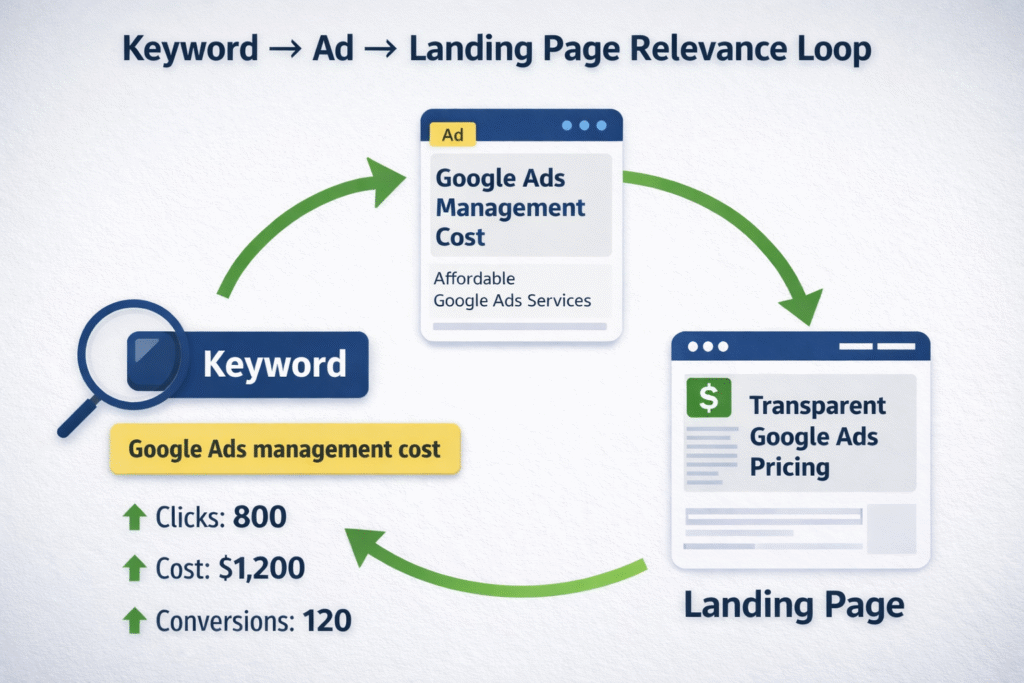
Keyword → Ad Copy → Landing Page Alignment (The Relevance Loop)
Quality Score is built on a simple but powerful loop:
Keyword → Ad Copy → Landing Page
If any part breaks, Quality Score drops.
- Keyword to Ad Copy: Your primary keyword (or variation) should appear naturally in headlines and descriptions.
- Ad Copy to Landing Page: The landing page must clearly reflect the promise made in the ad.
- Landing Page to Keyword: Page content should reinforce the original search intent.
For example, if the keyword is “Google Ads management cost”:
- The ad should mention pricing or cost transparency
- The landing page should explain pricing models, value, or estimates
Misalignment forces Google to work harder to match intent—and it charges you more for it.
Why Structure Directly Impacts Cost
Higher Quality Score leads to:
- Lower CPC
- Better ad positions
- Higher impression share with the same budget
This is why strong ad group structure Google Ads setups often outperform higher-budget competitors.
Good structure doesn’t just improve metrics—it unlocks scalability without inflating spend.
Best Practices for Keyword Structuring
- Keep ad groups tightly themed
- Avoid mixing informational and buyer keywords
- Match ad messaging to keyword intent
- Align landing pages to specific keyword themes
When relevance is high, Google does the heavy lifting for you.
Real-World Example: Right Keyword vs Wrong Keyword
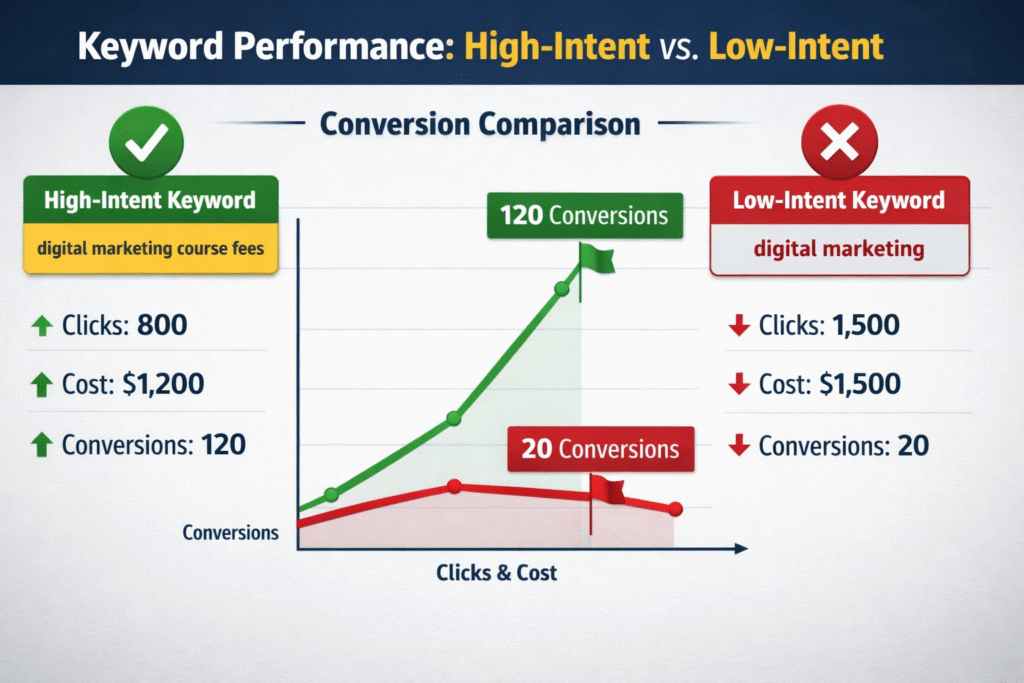
One of the clearest ways to understand keyword intent is to compare two keywords using the same budget—and see how dramatically results can differ. Below is a real-world style scenario that highlights why choosing the right keyword matters more than increasing spend.
Imagine two Google Ads campaigns, both running with the same daily budget, same ad quality, and similar landing page structure. The only difference? Keyword intent.
Scenario Overview: Same Budget, Different Intent
Campaign A targets a broad, high-volume keyword:
👉 digital marketing
Campaign B targets a high-intent, buyer-focused keyword:
👉 digital marketing course fees
At first glance, Campaign A looks attractive. The keyword has massive search volume and generates a lot of clicks. However, most users searching for “digital marketing” are:
- Exploring the topic
- Looking for definitions or career options
- Comparing fields, not buying
Campaign B, on the other hand, attracts users who are already evaluating cost and readiness to enroll. These users are much closer to conversion.
Conversion Comparison (30-Day Snapshot)
| Keyword | Clicks | Cost | Conversions |
| digital marketing | High | High | Low |
| digital marketing course fees | Medium | Medium | High |
Despite fewer clicks, the second keyword delivers significantly more conversions and a lower cost per lead.
Why This Happens
The difference lies entirely in intent alignment:
- digital marketing = informational/exploratory intent
- digital marketing course fees = transactional / decision-stage intent
Google Ads doesn’t charge you for intent—it charges you for clicks. If those clicks come from the wrong mindset, even the best ads won’t convert.
This is a common mistake in beginner campaigns: prioritizing traffic volume over conversion probability. High-intent keywords may look “smaller” in tools, but they outperform at the business level.
The Bigger Lesson
The right keyword:
- Attracts fewer but better users
- Improves conversion rate
- Lowers effective CPA
- Makes scaling predictable
The wrong keyword:
- Inflates clicks and cost
- Skews performance data
- Slows down optimization
This is why every strong Google Ads case study shows the same pattern: intent beats volume every time. A single keyword conversion example like this can save thousands in wasted ad spend.
Common Keyword Research Mistakes to Avoid
Keyword research can make or break your Google Ads performance. Many advertisers don’t fail because Google Ads “doesn’t work”—they fail because of avoidable keyword research mistakes that silently waste budget. Knowing what not to do is just as important as knowing what to do.
Below are the most common—and costly—keyword mistakes you should actively avoid.
1. Chasing High Search Volume Only
High-volume keywords look attractive in tools, but volume does not equal value. Broad terms often attract users who are:
- Researching
- Comparing careers
- Looking for free information
These keywords generate clicks but rarely generate conversions. Advertisers chasing volume usually end up with high cost and low ROI. Instead of asking “How many people search this?”, ask “How many of them are ready to act?”
2. Ignoring Search Intent
Intent is the difference between traffic and revenue. A keyword with unclear or informational intent will not convert—even with perfect ads.
For example:
- “digital marketing” → learning intent
- “digital marketing services pricing” → buyer intent
Ignoring intent leads to poor Quality Scores, low conversion rates, and rising CPCs. Strong campaigns are built around commercial and transactional intent, not curiosity.
3. Not Reviewing the Search Terms Report
One of the biggest keyword research errors is setting up keywords and never checking what users actually typed.
Without reviewing search terms:
- Ads trigger for irrelevant queries
- Budget leaks into low-quality traffic
- Smart bidding learns the wrong signals
The search terms report should be reviewed:
- Daily for new campaigns
- Weekly for stable accounts
Every irrelevant query you block improves performance
4. Overusing Broad Match Without Control
Broad match is not bad—but it’s dangerous without:
- Strong negative keywords
- Conversion data
- Smart bidding
Many beginners turn on broad match too early, allowing Google too much freedom. This often leads to irrelevant clicks, high spend, and confusion about why conversions aren’t happening.
Broad match should be used strategically, not as a shortcut.
Most Google Ads mistakes don’t come from complex strategy—they come from ignoring fundamentals. Avoiding these errors:
- Improves conversion quality
- Protects your budget
- Makes optimization easier
Good keyword research is not about doing more—it’s about doing it right.
Tools That Help Find the Right Keyword for Google Ads
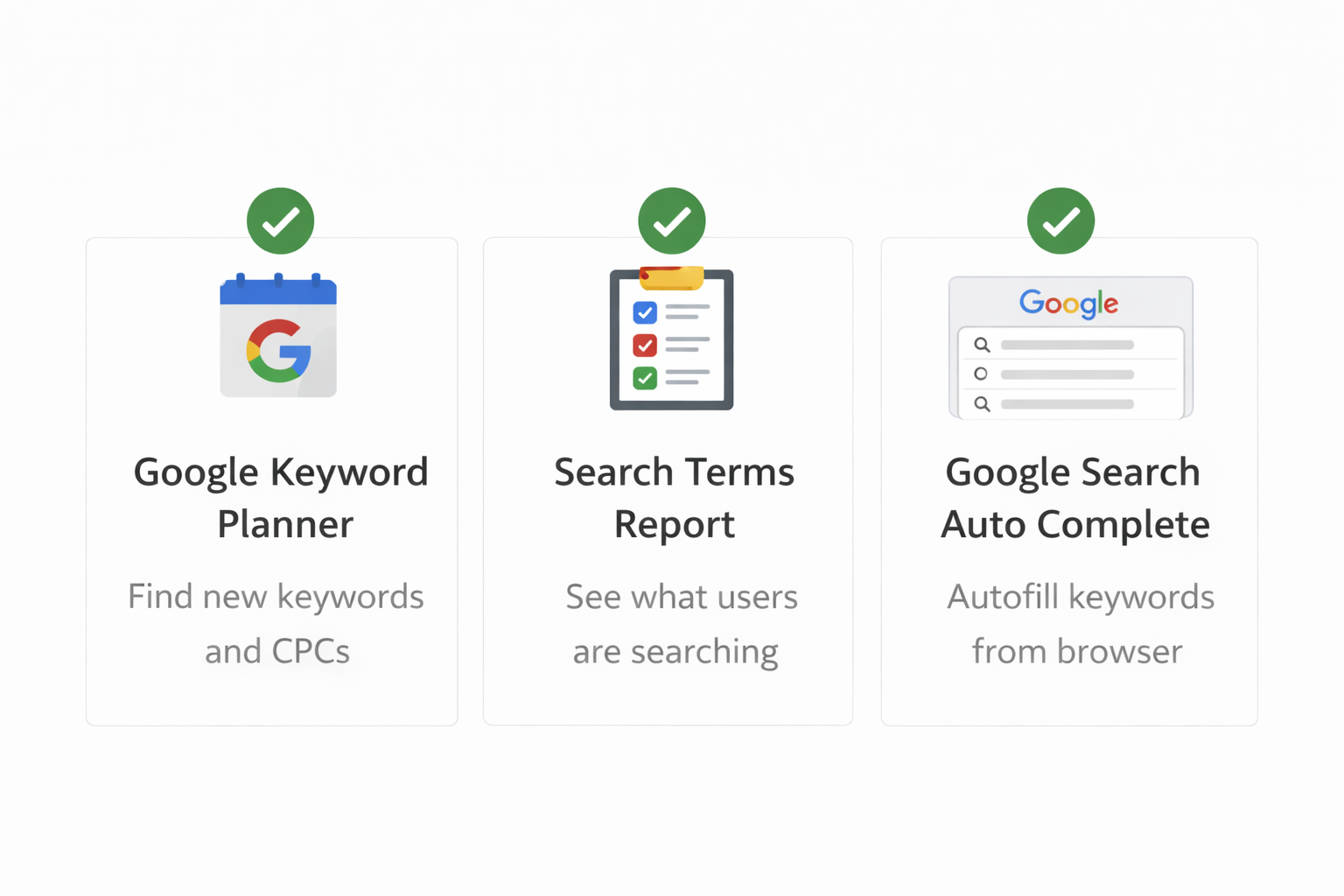
Finding the right keyword for Google Ads becomes much easier—and more accurate—when you use the right tools together, not in isolation. No single tool gives the full picture. Smart advertisers combine Google’s native data with real search behavior to identify keywords that actually convert.
Below are the most effective and practical tools you should rely on.
1. Google Keyword Planner (Foundation Tool)
Google Keyword Planner is the starting point for almost every paid search strategy. It provides direct data from Google, making it one of the most reliable tools for keyword discovery.
What to focus on:
- Average CPC: Higher CPC often signals strong commercial intent
- Competition: Shows advertiser demand, not SEO difficulty
- Keyword variations: Helps expand buyer-intent themes
The biggest mistake is using Keyword Planner only for search volume. Instead, treat it as an intent filter. Keywords with low CPC and low competition may look attractive, but they often lack buying intent.
Used correctly, this tool helps you shortlist keywords worth testing—not finalizing.
2. Search Terms Report (Most Powerful, Most Ignored)
The Search Terms Report is where real keyword truth lives. Unlike planners or forecasts, this report shows the exact phrases users typed before clicking your ad.
Why it matters:
- Reveals hidden high-converting keywords
- Exposes wasted spend from irrelevant queries
- Helps build strong negative keyword lists
Many top-performing keywords are discovered after campaigns go live—inside this report. Reviewing it regularly turns Google Ads into a self-improving system.
Best practice:
- New campaigns: review daily
- Stable campaigns: review weekly
This tool alone can drastically improve ROI when used consistently.
3. Google Search Autocomplete (Intent Discovery Tool)
Google Search autocomplete is a simple but highly underrated keyword research tool. When you type a query into Google and see suggestions, those suggestions are based on real, frequent user searches.
Why it works:
- Reveals natural language queries
- Shows how users phrase buyer intent
- Helps uncover long-tail, high-intent keywords
For example, typing “Google Ads management” may reveal suggestions like pricing, cost, or services—all strong commercial signals.
This tool is especially useful for refining ad group themes and ad copy relevance.
The best advertisers don’t rely on one tool—they connect insights across tools. Keyword Planner gives direction, Search Terms Report gives validation, and autocomplete reveals intent patterns.
Together, these form the backbone of effective keyword research tools for Google Ads and help identify the best tools for Google Ads keywords that actually drive results.
Final Thoughts: How to Always Choose the Right Keyword for Google Ads
Choosing the right keyword for Google Ads is not a one-time task—it’s an ongoing decision-making process that directly determines whether your campaigns generate profit or loss. More than ad copy, bids, or even landing pages, keywords shape the quality of traffic you pay for.
The most important mindset shift is this:
👉 Think intent first, volume second.
High search volume may look impressive in tools, but intent is what drives conversions. A keyword searched 100 times by ready-to-buy users will always outperform a keyword searched 10,000 times by people who are just browsing or learning. Successful advertisers don’t chase traffic—they chase decision-stage users.
The second rule is to test, optimize, and refine continuously. No keyword research is perfect on day one. Launch with strong intent-based keywords, then let real data guide you. Monitor:
- Search terms reports
- Conversion rates by keyword
- Cost per conversion trends
Pause what doesn’t convert, scale what does, and refine match types and negatives regularly. Google Ads rewards advertisers who adapt, not those who “set and forget.”
Most importantly, remember this truth:
Keywords decide profit or loss.
The same budget, the same ads, and the same landing page can produce wildly different results—purely based on keyword intent. That’s why professional advertisers spend more time refining keywords than adding new ones.
If you consistently:
- Prioritize buyer intent
- Avoid low-intent and research-only terms
- Structure keywords tightly
- Review search terms regularly
…you’ll never feel that Google Ads is “too expensive.” Instead, it becomes predictable, scalable, and controllable.
In the end, Google Ads doesn’t reward who spends the most—it rewards those who understands intent the best. Master that, and choosing the right keyword becomes a competitive advantage, not a guessing game.
What is the right keyword for Google Ads?
The right keyword for Google Ads is one that matches user intent, is highly relevant to your offer, and has clear commercial or transactional value.
How do I find the right keyword for Google Ads?
You can find the right keyword using Google Keyword Planner, search term reports, competitor analysis, and by focusing on buyer-intent phrases like pricing, cost, or near me.
Are high-volume keywords good for Google Ads?
Not always. High-volume keywords often have low intent and high competition, which can increase costs without generating conversions.
What keyword intent works best for Google Ads?
Transactional and commercial intent keywords work best because users are closer to taking action, such as buying or enquiring.
Which keyword match type is best for beginners?
Phrase match is best for beginners as it offers a balance between reach and control while avoiding highly irrelevant traffic.
What keywords should I avoid in Google Ads?
Avoid informational and low-intent keywords like free, jobs, what is, and how to unless they align with your campaign goal.
Why are negative keywords important?
Negative keywords prevent your ads from showing for irrelevant searches, helping reduce wasted spend and improve conversion rates.
How often should I check the search terms report?
You should review the search terms report at least once a week to identify irrelevant queries and add new negative keywords.
How many keywords should I use per ad group?
Ideally, use 5–15 closely related keywords per ad group to maintain relevance and improve Quality Score.
Can the wrong keywords waste my Google Ads budget?
Yes. Targeting the wrong keywords can lead to irrelevant clicks, low conversions, poor Quality Score, and high cost per acquisition.
💡 Interested in learning more? Contact RKDMT – Raju Kumar Digital Marketer (Best Digital Marketing Training Institute)
🔗 www.rajukumardigitalmarketer.com
📞 +91-7303933302 | +91-9217057127
📧 rkdmt@rajukumardigitalmarketer.com

Founder at Digital Marketing Marvel | Founder at RKDMT – Raju Kumar Digital Marketing Trainer | Best Digital Marketing Trainer in Delhi/NCR – Digiperform | Project Manager | 5+ years | Genius Study Abroad & Inlingua’s Digital Marketing Head | Learn Digital Marketing